




We’re planning to roll out a few small visual updates in Globott this coming weekend.
We hope these changes will help you find the key options much faster and more easily.
Here’s a list of the most important updates:
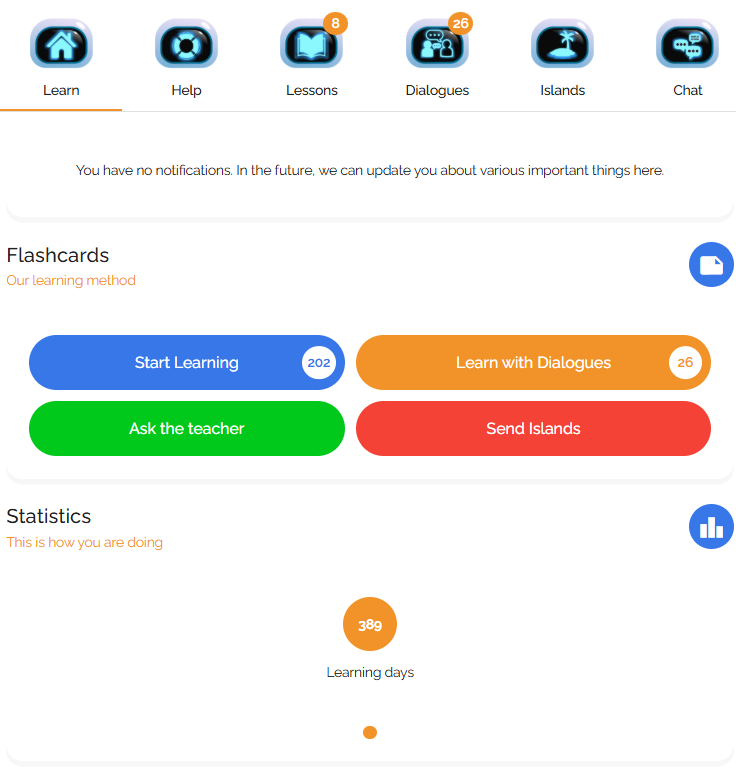
New Menu on the Course Screen
At the top of each course screen, you’ll now see a menu with links to the most important sections.

Some options will be hidden or unavailable depending on the features offered in a particular course. For example, if a course doesn’t include dialogues, the “Dialogues” icon won’t appear.
It will now be much easier to access the Help section.
We’ve also separated Lessons from Dialogues, making it much simpler to use both.
The Islands (texts to be reviewed) will now be in a separate section.
Orange icons with numbers will notify you about new lessons, dialogues, and reviewed islands.
Buttons
We’ve added more quick-access buttons to let you jump straight to the most important parts of the course.
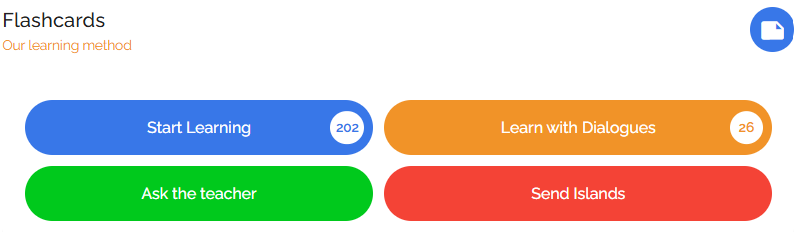
We also improved the icon with the number indicator that shows how many flashcards are ready for review, how many new dialogues are available, and whether there are new messages from your teacher or reviewed islands.
Help Section
We’ve fixed a few minor issues related to using the Help section on mobile devices.
Now, when you tap on an article title, it will open directly on the main screen. When you open a new article, you’ll automatically be taken to the top of the page—no more scrolling manually.
Mobile View
We’ve simplified the layout on phones and tablets. Most important information—like the menu, notifications, buttons, and your study day info—should now fit on one screen without the need to scroll.
When Will the Changes Happen?
These updates will go live in Globott over the weekend of June 21–22, 2025.
During this time, Globott might be briefly unavailable for a few minutes.
These changes won’t affect your progress or settings. But if you do encounter any issues, just let us know and we’ll do our best to help you find a solution.
